Go live in portrait for Shorts, Reels and TikTok
Send a vertical version of your show to Shorts, Reels or TikTok while the landscape stream goes to YouTube and the rest, from the same Mac and the same Program.
Phones hold the live feeds of Shorts, Reels and TikTok upright, and a landscape stream in them is a thin strip across the middle of the screen. You do not need a second show, or a phone filming the screen, to fill it: InterDirector makes a portrait version of your Program itself, for one destination, while your other destinations stay landscape.
1. Add the portrait platform as a destination
Press the gear beside Stream, then Add Destination, and paste the server address and stream key from the platform’s live settings, as for any destination. Not every account is given a stream key for a vertical live stream; the platform’s own live settings say whether yours has one.
2. Give it its own encoding, in portrait
Switch on Use its own encoding for that destination. It now has its own settings, and its Picture chooses how Program becomes portrait:
- Portrait, cropped fills the frame with the middle of Program. Simplest for a show of people talking, or one camera following the action.
- Portrait, fitted shows all of Program, smaller, with black above and below. Nothing is lost, but the picture fills only about a third of the screen’s height.
- Portrait, rotated turns Program a quarter clockwise, nothing cut. It is for a Show built on its side for portrait, not for an ordinary landscape show.
Then choose its Resolution: 1080 × 1920, or 720 × 1280 for a slower connection.
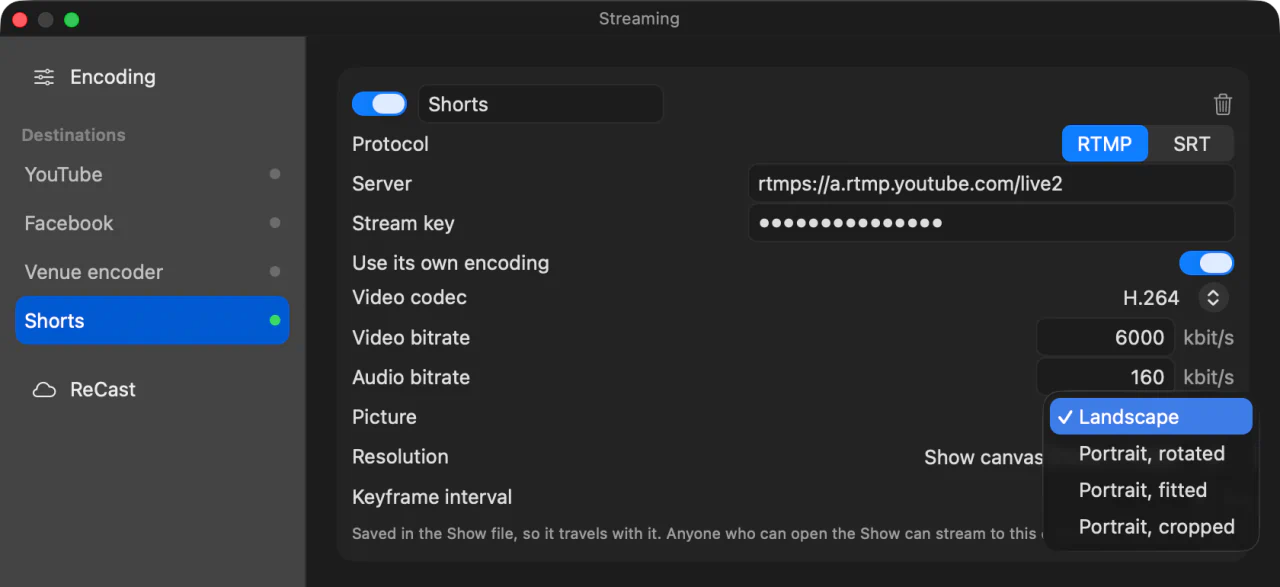
The picture and the resolution change while the destination is switched off, as the resolution always does, so set them before you go live.
3. Keep the action, and the graphics, in the middle
A cropped portrait is the middle of Program, a little under a third of its width. Whatever sits at the sides is not in it:
- Lower thirds and logos in a corner fall outside. Use a graphic that sits in the middle, or choose Portrait, fitted for this destination.
- Wide shots lose their edges. Frame the cameras that go to Program a little tighter, or cut to them less.
- The landscape destinations still get all of Program, so what you change for portrait shows there too.
Look at the middle third of Program as you direct: that is the portrait stream.
4. Go live
Press Stream, and every enabled destination starts together, the portrait one among them. A Statistics input, in the multiview or on a second display, shows each destination with what it is sending, so you can see the portrait one is healthy without opening a window.
What it costs your upload
A destination with its own encoding has an encoder of its own and is a stream of its own on the venue’s connection: a portrait stream at 6 Mbit/s adds 6 Mbit/s to whatever your landscape destinations already send.
If the venue’s upload is tight, InterDirector ReCast makes portrait versions in the cloud instead, from the one stream you send it: two portrait outputs, 720 × 1280, either Program turned a quarter or the whole landscape picture fitted inside, at no cost to the venue. See Stream to YouTube, Facebook and Twitch at once for the two ways side by side.